Data Lookup is a Buyer enabled function that allows them to upload Cost Object data to Workbench, providing a Supplier the ability to search for and select Cost Objects by value or description at the point if Invoice creation in Workbench. This mitigates the need for Suppliers to go to the Buyer's website to access lists of Cost Objects spreadsheets, and then going back to Workbench to manually enter the data. This results in a reduction of coding errors and subsequent Invoice rejection.
| NOTE | If you are interested in using Data Lookup, please contact your Trading Partner to request that they have Data Lookup enabled. |
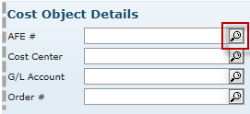
If your Trading Partner has Data Lookup enabled, applicable Cost Objects will display a magnifying glass icon ( ) to the right of that field.
| WARNING | The values and descriptions in the data uploaded to Workbench are the responsibility of the Buyer. If any issues are encountered with the data (i.e. incorrect value or inadequate description), please contact your Trading Partner to resolve the issue. |
Scenario: Your Trading Partner has informed you to use a specific Cost Object type (i.e. an AFE) for a specific project. You do not have the AFE Number on hand, but you do know the location associated with the project.
There are two ways to approach this scenario:
 Data Lookup at the Header Level (Customer Info Tab)
If your Cost Object Details are the same for the entire Invoice, you could define these details most efficiently, by entering the Cost Object Details for the majority of the Line Items on the Customer Info tab. All these details will be automatically assigned to all Line Items on your Invoice. You can then change the Cost Object Details for any Line Items that are different from the rest, if required:
- Click on the Customer Info tab.
- Go to the Cost Object Details section.

- Click the magnifying glass icon next the appropriate Cost Object.
A 'Select Cost Object' window will display.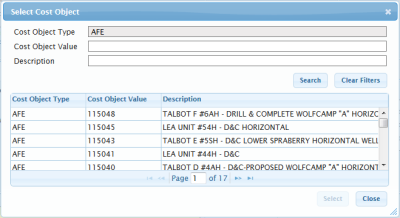
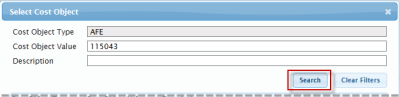
- Enter a Cost Object value or description in the appropriate field.

A minimum of three characters need to be entered to perform a search. - Click the 'Search' button.
A 'Loading...' message will display.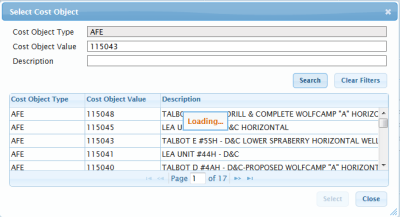
The search result will then display.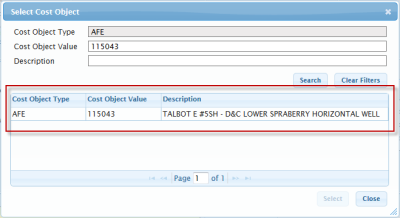
If the listed result is still too large, you can refine the value or description further. - Click on the Cost Object.

- Click the 'Select' button at the bottom of the window.
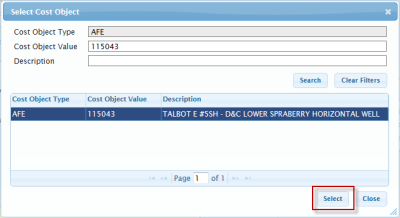
The selected Cost Object displays in the 'Cost Object Type' and 'Cost Object Value' fields of the line.
Data Lookup at the Line Item Level
If your AFE Cost Object Details are different on the Invoice, you can search for and select individual Cost Objects by Line Item:
| NOTE | Only one Cost Object value can be selected per Line Item. |
- Click the Cost Object Details button in the Cost Object Type field.

The 'Cost Object Details' window will display.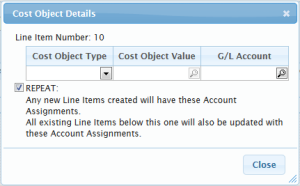
- For each of the cost objects you require, select a Cost Object Type to activate the related Cost Object Value field.
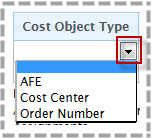
The 'Cost Object Value' field becomes active.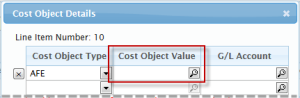
- Click the magnifying glass icon next to the 'Cost Object Value' field.
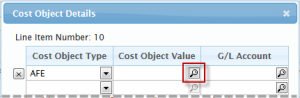
A 'Select Cost Object' window will display. - Enter a Cost Object value or description in the appropriate field.
A minimum of three characters need to be entered to perform a search. - Click the 'Search' button.
A 'Loading...' message will display.
The search result will then display.
If the listed result is still too large, you can refine the value or description further. - Click on the Cost Object.
- Click the 'Select' button at the bottom of the window.
The selected Cost Object displays in the 'Cost Object Type' and 'Cost Object Value' fields of the line.
For more information on defining Purchasing Details and Cost Object Details for Line Items, refer to: